Posts

Use Bluetooth Headphone or Speaker on Ubuntu 16.04 [Solved]

I recently got a soundbot wireless portable speaker, which is by the way really great! but It had some issues making it work with ubuntu. After pairing it was working with Headset Head unit (HSP/HFP)  which produced a really bad audio quality. to get the sound right It should be using the High Fidelity playback (A2DP Sink) but it wouldn't select that profile from the sound preferences. Read more »

Install latest Node.js version in ubuntu 16.04

Image
Node.js is an opensource JavaScript based framework for server-side scripting. Ubuntu Repository has the older version of node.js To get the updated version you need to install node.js using the PPA by provided by NodeSource. for 6.x versions (LTS version) curl -sL https://deb.nodesource.com/setup_6.x | sudo -E bash - for 7.x versions (current active release) curl -sL https://deb.nodesource.com/setup_7.x | sudo -E bash - after this the PPA will be added and repository will be updated automatically, now install the updated node.js version sudo apt-get install nodejs

How to Add / Append items to a list in Python

To add items to a list in python is a very general task that you might come across. Here we have an empty list that we are populating with 10 items using the append method. n = 10 list = [] for i in range(n): list.append(input()) print list That's it! Common Mistake its a common mistake of doing something like this n=10 list=[] for i in range(n): list[i]=input() this will throw an error IndexError: list assignment index out of range Because the list is empty and list[i] is trying to access index which does not exist!

Set Permissions to add files to /var/www folder in ubuntu linux

/var/www is the default root folder of your local web server (like apache ), you host all your website files here and access it on the browser with url like http://127.0.0.1 or http://localhost you cannot simply copy paste stuff in this folder using your file browser, It is protected for security reasons, you will get a permission denied error message because by default you don't have write access permission here. Follow these Steps: execute these commands to set all permissions for /var/www directory sudo adduser <username> www-data sudo chown -R www-data:www-data /var/www sudo chmod -R g+rwX /var/www replace <username> with your actual username. Now you can copy, edit and create files in /var/www folder just like any other folder.

How to install python-gst (pygst) in ubuntu 16.04

pygst is the python binding of Gstreamer which is a media-framework, it supports various media handling such as audio playback, video playback and editing. Installation open up the terminal and enter the following commands sudo apt-get update sudo apt-get install python-gst-1.0 Check if its working properly open up your python shell and import pygst aman@vostro:~$ python Python 2.7.11+ (default, Apr 17 2016, 14:00:29) [GCC 5.3.1 20160413] on linux2 Type "help", "copyright", "credits" or "license" for more information. >>> import pygst >>> if its not installed properly then an error message will be shown: ImportError: No module named pygst

Syntax Highlighting with Google code-prettify and bootstrap

Image
Google Code Prettify automatically detects your source code and highlights it accordingly. It's quite simple to setup. Read more »

Python Program for Binary Search with explanation

Binary search algorithm is used to find a number in a sorted list. so, the pre condition for binary search is that the list should be sorted. If the number is found then its index is returned. This algorithm works on divide and conquer principle. Read more »

How to style Django Forms with Bootstrap

Image
Though we can use third-party packages like Django-Crispy forms to style forms in django with ease but still it's sometimes required to style django generated forms all by yourself, here we will see how to do that. the form will be able to show errors also. Read more »

Connect Filezilla with Amazon EC2 Ubuntu Server

In this quick guide we will learn how to connect to your amazon aws ec2 ubuntu server using a FTP client like Filezilla. 1. first make sure filezilla is installed sudo apt-get install filezilla Read more »

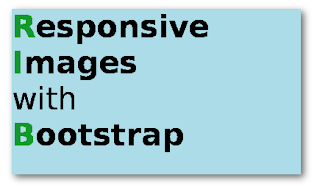
Make all Images responsive with bootstrap automatically!

Image
Hi guys, in this post we will see how to make all images on your website responsive automatically with bootstrap. this will get rid of the problem of the images breaking out of the content area of your website on any kind of display. I have written a simple script that will apply the img-responsive bootstrap class to all your images. Read more »

Install JavaScript & CSS Minifier in Sublime text 3

Image
This is a short guide on how to install Javascript & CSS Minifier, called Sublime-Minifier . This minifier works for both sublime text 2 and 3 and supports all platforms -  Linux, Mac OS & Windows. Read more »

How to install & use TeamViewer on ubuntu 16.04

Teamviewer is a desktop sharing and remote control application, users can remotely control the desktop of the connected computer. Follow these steps to install it on Ubuntu Linux. Read more »

How to Install and use Django Crispy Forms

Crispy forms is a third party django app that makes styling forms really simple. It makes your forms look beautiful with almost no effort from your side. It supports different template packs like uni-form, foundation, bootstrap and  bootstrap3  , that's what we will be using. Setting it up is simple as well with these few steps that I have shown below Read more »

Simple Hello World page with django 1.9 in Ubuntu / Linux Mint [Beginners] [Part - 2]

In the First part of this tutorial we created an app named helloworld and added it to the setting.py file. Now let's continue further towads our journey to make a 'Hello World' page with django. Read more »

Simple Hello World page with django 1.9 in Ubuntu / Linux Mint [Beginners] [Part - 1]

Django is a web framework written in python. It is good for fast web application development. In this tutorial we will learn how to make a simple web page showing "Hello World" using django templates. we will also be applying styling to our page with css static files, we won't be dealing with any database or any advanced stuffs here. This tutorial is aimed at beginners, So I 'll try to explain things in simple language without much technical detail. Read more »

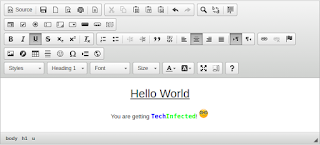
How to Install wysiwyg editor in your django project

Image
with django-wysiwyg , you get different rich html text editors, making it easier to write article posts. It supports TinyMCE, CKEditor, Redactor, Froala, yui and more Follow the below steps to setup django-wysiwyg in your django project. Read more »

How to Write, Compile and Run a C/C++ Program in Fedora Terminal

Image
In this tutorial we will see how to how to write, compile and run a C or C++ program in fedora terminal itself i.e writing, compiling and execution of the program will be done within the terminal itself. For writing any program we need a console (terminal) based text editor. I 'll be using vim editor, there are many more like nano, jed, emacs... Read more »

Run Python SimpleHttpServer on Amazon AWS EC2

Image
With Python's SimpleHTTPServer you can quickly setup a webserver without any hassle. In order to use it, you don't need to install or configure anything.. you just need to have python installed on your server. Step 1: Open up your AWS console and in your instance security group make the Inbound & Outbound settings like shown in the sceenshots below Step 2: Login into your remote server via ssh example: aman@vostro:~$ ssh -i yourkeyfile.pem ubuntu@your-server-ip Read more »

Ubuntu Installer does not show existing Partitions but free space [fixed]

Image
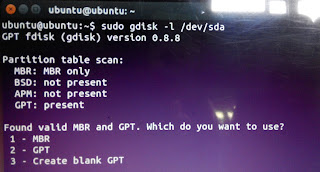
If during ubuntu installation you don't see your existing partitions but all free space then there might be two possibility. 1. You have both GPT and MBR partition tables present on your hard disk.. It is generally caused when you install different windows in the past which used a different partition table scheme (MBR or GPT). So you end up with both Schemes. So we must make all partition scheme the same. Check if you have multiple partition schemes with this command sudo gdisk -l /dev/sda In the screenshot below, It shows that MBR and GPT both are present. Read more »

Code Syntax Highlighting in django with Pygments

Image
Syntax Highlighting is a very much useful if you put code on your website. This can be easily achived with django-pygments . over 300 languages are supported. List of supported Languages:   http://pygments.org/languages/ django-pygments is the implementation of the pygments syntax highlighter for django. usage is quite simple. after setting up everything, you need to put necessary template tags and then place your code in pre tags with a lang attribute specifying the language of the source code in your template. example: <pre lang="python">YOUR CODE</pre> 1. First, Install the following packages. pip install pygments pip install django-pygments Read more »